WELCOME TO THE FAQ
Here are the most frequently asked questions!
1) How do I get my VIP content?
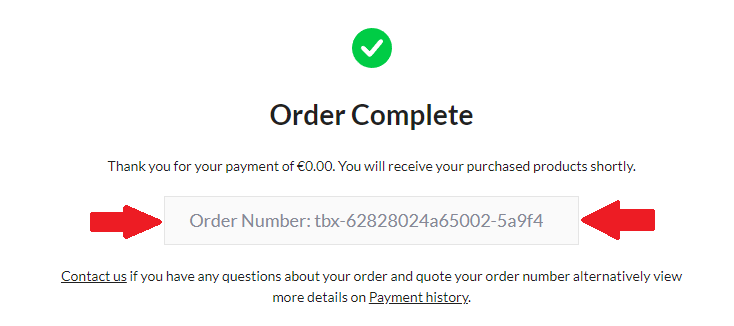
All you have to do is go to discord then open a ticket claiming what is due to you with your order code which looks like this: (tbx-xxxxxxxxxxxxxxxxxxxxxx).
2) Where can I find my code after my purchase??
Once you've entered your information and paid, a page will appear with your order number. This number will be used as your RC code and must be provided in your VIP ticket.
Haven't seen it? Just check your email, you'll find your code there, which looks like this.: (tbx-xxxxxxxxxxxxxxxxxxx)
3) How to open the in-game shop
Once in-game, simply press your "T" key, then type /shop, or open it from your F5 menu.
4) I don't know how to get my Red Coins back
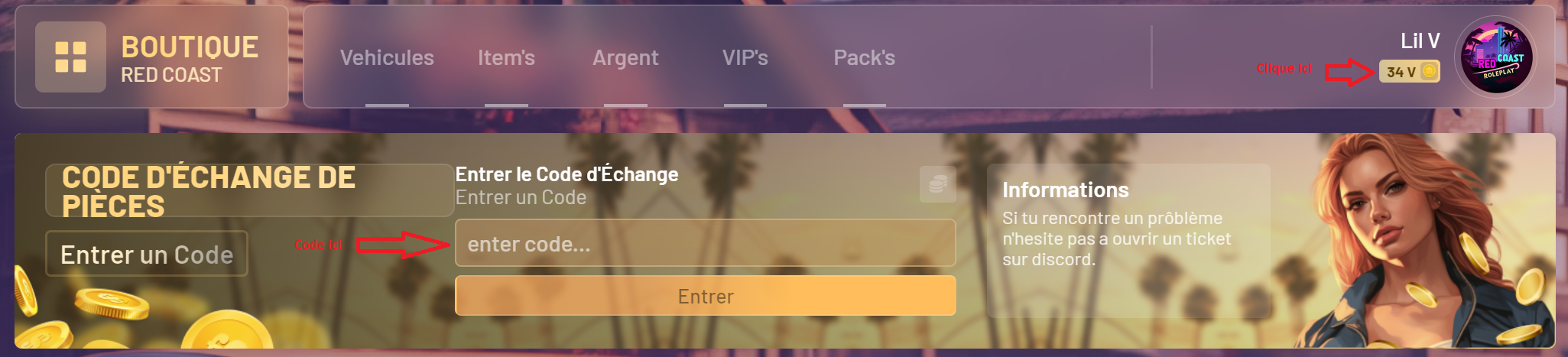
Here's how to redeem your code on the in-game store
Click on "your balance" at the top right of the store (in-game), then enter the code in the section provided for this purpose (see image below).
Note : It is possible that your code does not work instantly, don't panic, it can take 5 to 10 minutes. (If this is not the case, contact our teams on Discord by opening a ticket)